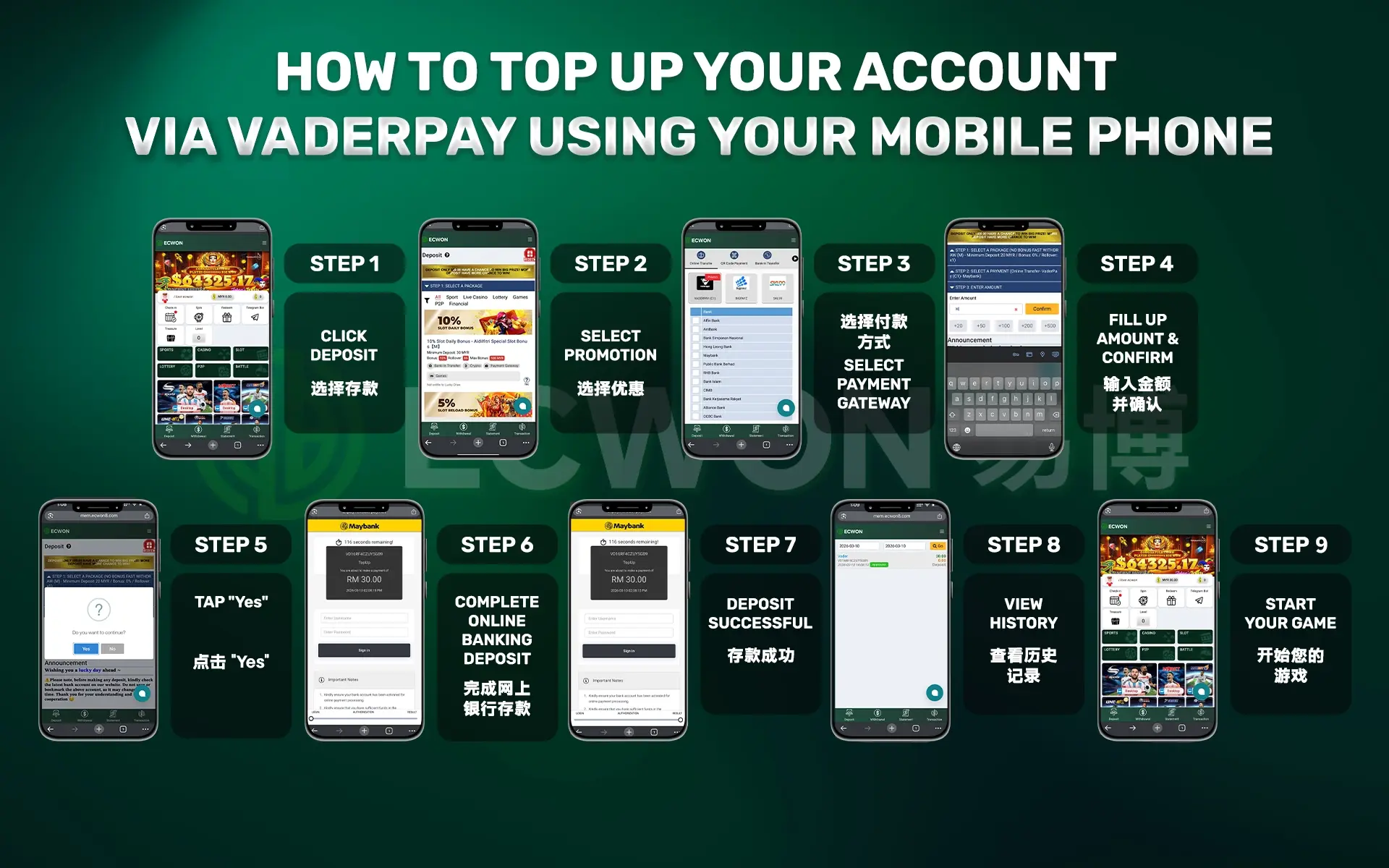
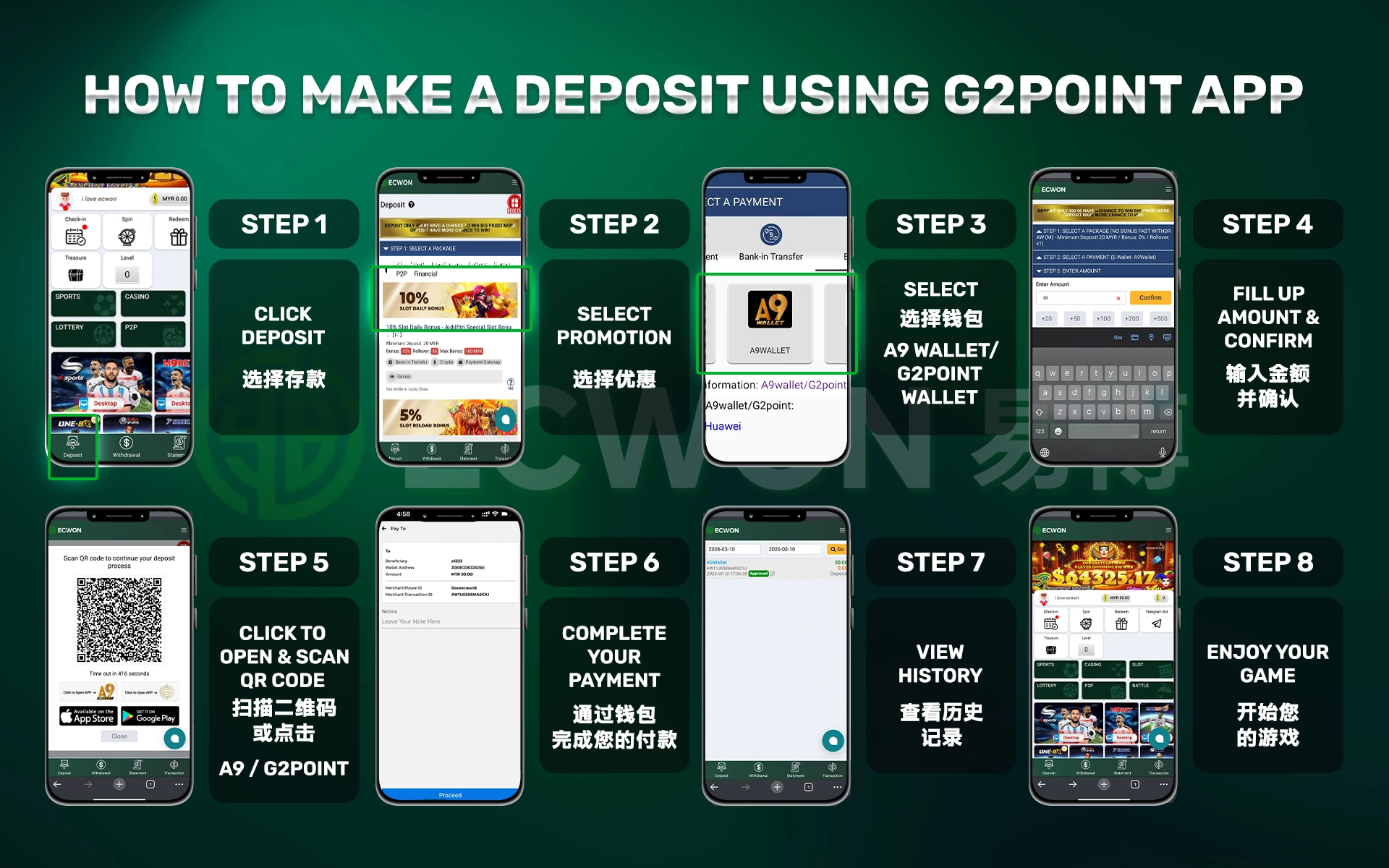
Please refer to the following steps for Deposit (Mobile) :
Please refer to the following step for Deposit (PC) :
Step 1: Login to your Game ID & select "Deposit”.
Step 2: Choose the promotion package that you wish to redeem.
Step 3: Choose the Payment Method 【VADERPAY / BIGPAYZ】 to
make deposit.
Step 4: Fill up the Deposit Amount that you would like to
deposit & click "Next".
Step 5: Double check & confirm your deposit amount &
promotion is correctly & click "Save".
Step 6. Complete your payment.
Congratulations! You have successful make a deposit.
You can check the deposit status after then.
NOTES: You can also deposit through CDM (Cash Deposit) ,
E-Wallet (Touch'n Go, Grab Pay, Shopee Pay, Boost Pay &
DuitNow) or Normal Bank Transfer.
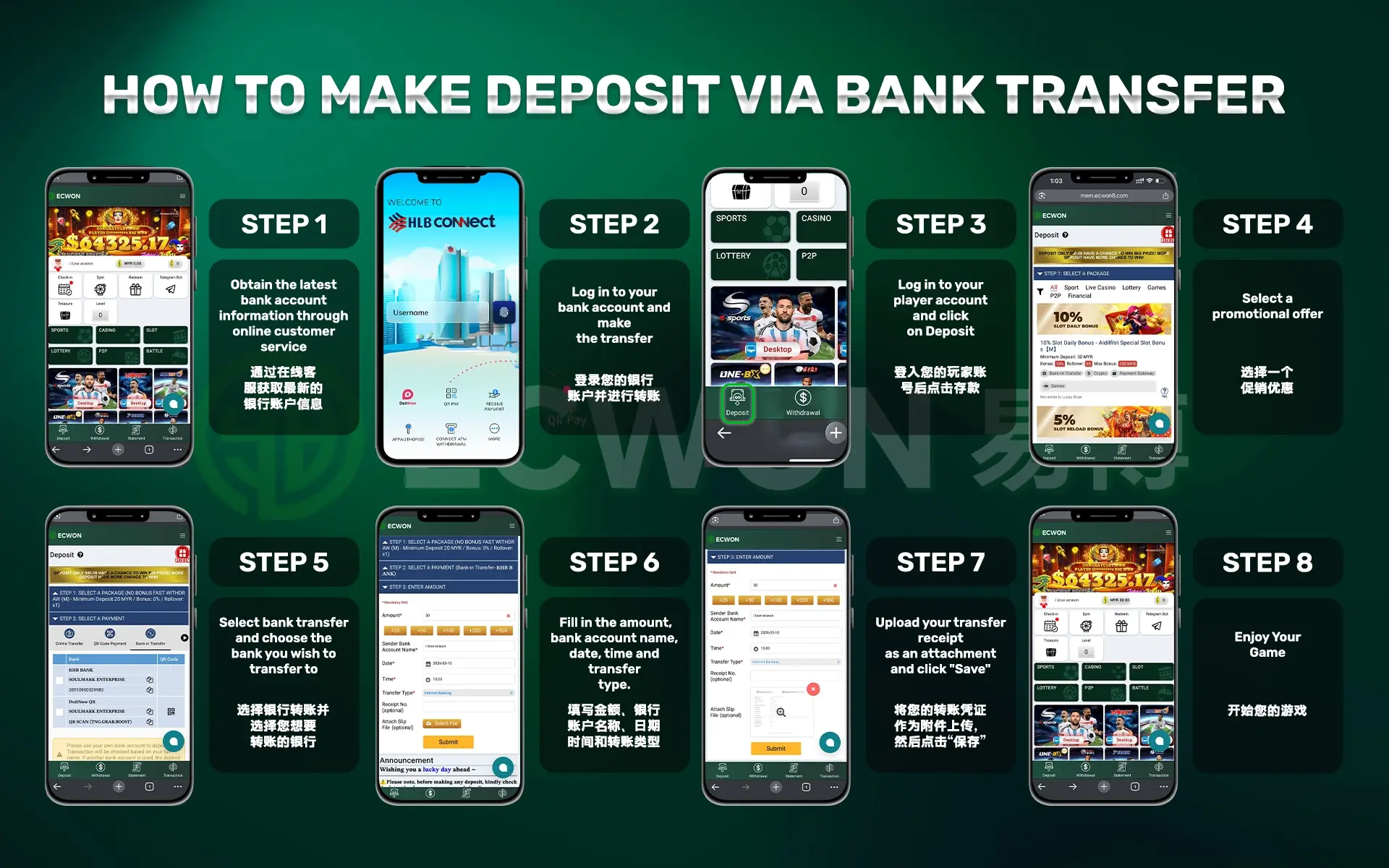
DEPOSIT VIA BANK-IN
Please refer to the following step for Deposit :
Step 1: Get latest bank account via LIVECHAT.
Step 2: Login to your bank and make transfer.
Step 3: Login to your player id and click deposit.
Step 4: Choose promo.
Step 5: Choose bank-in transfer and select the bank you
transfer.
Step 6. Fill up amount, your bank account name, date, time, and
transfer type.
Step 7. Upload your transfer receipt to attach slip file &
click save.
Congratulations! You have successful make a deposit.
You can check the deposit status after then.
YOU CAN DEPOSIT WITH 5 TYPES OF E-WALLET
Please refer to the following steps for Deposit:
Step 1: Login your Game ID & select "Deposit”.
Step 2: Choose the promotion package that you wish to redeem.
Step 3: Select "Pay Essence" and choose (Touch'n Go / Boost /
Grab pay / Shopee / DuitNow) e-wallet to make deposit.
Step 4: Fill up the Deposit Amount that you would like to
deposit & click "Next".
Step 5: Double check & confirm your amount & promotion
is correctly & click "Save".
Step 6. Scan the QR code using (Touch'n Go / Boost / Grab pay /
Shopee Pay / DuitNow) App & fill up amount that you would
like to deposit and amount should match with STEP 4.
Congratulations! You have successful make a deposit.
You can check the deposit record after then.
DEPOSIT VIA A9 WALLET (PAYMENT GATEWAY)
Please refer to the following steps for Deposit:
Step 1: Login to your Game ID & select "Deposit”.
Step 2: Choose the promotion package that you wish to redeem.
Step 3: Choose the Payment Method 【E-WALLET (A9 WALLET)】 to
make deposit.
Step 4: Fill up the Deposit Amount that you would like to
deposit & click "Next".
Step 5: Double check & confirm your deposit amount &
promotion is correctly & click "Save".
Step 6. Complete your payment via A9 wallet.
Congratulations! You have successful make a deposit.
You can check the deposit status after then.
NOTES: You can also deposit through CDM (Cash Deposit) ,
PayNow/DuitNow Transfer or Normal Bank Transfer.
Please refer to the following steps for Deposit (Mobile) :
Please refer to the following step for Deposit (PC) :
Step 1: Login to your Game ID & select "Deposit”.
Step 2: Choose the promotion package that you wish to redeem.
Step 3: Choose the Payment Method 【VADERPAY / BIGPAYZ】 to
make deposit.
Step 4: Fill up the Deposit Amount that you would like to
deposit & click "Next".
Step 5: Double check & confirm your deposit amount &
promotion is correctly & click "Save".
Step 6. Complete your payment.
Congratulations! You have successful make a deposit.
You can check the deposit status after then.
NOTES: You can also deposit through CDM (Cash Deposit) ,
E-Wallet (Touch'n Go, Grab Pay, Shopee Pay, Boost Pay &
DuitNow) or Normal Bank Transfer.
DEPOSIT VIA BANK-IN
Please refer to the following step for Deposit :
Step 1: Get latest bank account via LIVECHAT.
Step 2: Login to your bank and make transfer.
Step 3: Login to your player id and click deposit.
Step 4: Choose promo.
Step 5: Choose bank-in transfer and select the bank you
transfer.
Step 6. Fill up amount, your bank account name, date, time, and
transfer type.
Step 7. Upload your transfer receipt to attach slip file &
click save.
Congratulations! You have successful make a deposit.
You can check the deposit status after then.
YOU CAN DEPOSIT WITH 5 TYPES OF E-WALLET
Please refer to the following steps for Deposit:
Step 1: Login your Game ID & select "Deposit”.
Step 2: Choose the promotion package that you wish to redeem.
Step 3: Select "Pay Essence" and choose (Touch'n Go / Boost /
Grab pay / Shopee / DuitNow) e-wallet to make deposit.
Step 4: Fill up the Deposit Amount that you would like to
deposit & click "Next".
Step 5: Double check & confirm your amount & promotion
is correctly & click "Save".
Step 6. Scan the QR code using (Touch'n Go / Boost / Grab pay /
Shopee Pay / DuitNow) App & fill up amount that you would
like to deposit and amount should match with STEP 4.
Congratulations! You have successful make a deposit.
You can check the deposit record after then.
DEPOSIT VIA A9 WALLET (PAYMENT GATEWAY)
Please refer to the following steps for Deposit:
Step 1: Login to your Game ID & select "Deposit”.
Step 2: Choose the promotion package that you wish to redeem.
Step 3: Choose the Payment Method 【E-WALLET (A9 WALLET)】 to
make deposit.
Step 4: Fill up the Deposit Amount that you would like to
deposit & click "Next".
Step 5: Double check & confirm your deposit amount &
promotion is correctly & click "Save".
Step 6. Complete your payment via A9 wallet.
Congratulations! You have successful make a deposit.
You can check the deposit status after then.
NOTES: You can also deposit through CDM (Cash Deposit) ,
PayNow/DuitNow Transfer or Normal Bank Transfer.